What's The Difference - Case Processing Time
B
Briana Coffman
Published:
07/07/25 4:34 PM
63 views
2
63
Hi Everyone,
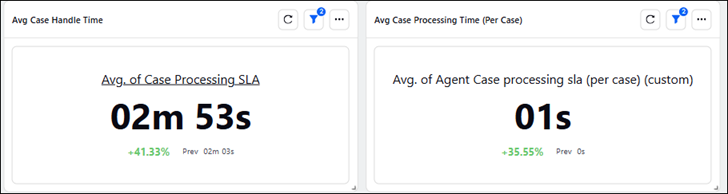
Can you please help me understand the difference between the two? I've plugged them both into a widget and set their calculation to be averages and I get different results. I'm just trying to understand because in the widget library, they're listed the same.
- Case Processing Time The time spent by an agent working on a Case as per the case processing clock. This is calculated by adding the time spent by agent on a Case on Agent console or Third Pane. If the case window is toggled in, clock pauses and resumes when agent comes back to that screen.
- Avg Case Processing Time (Per Case) The average time spent by agent on a Case based on Case processing time and number of Cases that is opened by the agent. If this metric is plotted with Case, it will show the same value as the Case Processing Time Metric. For example, if Agent A works on Case #1 for 5 minutes, and again on Case #1 for 10 minutes, and also works on Case #2 for 5 minutes, then the average handling time will be (5+10+5)/2 = 10 minutes.

Sprinklr User Network
Customer Service
Reporting
Analyze
Question
Updated
4 days
Allison Fasching
1 year
ago
09/07/2025
Hi Brianna! I agree it is confusing as the names sound very similar, and they even use the same underlying logic. Here's a clear breakdown of the difference between Case Processing Time and Avg Case Processing Time (Per Case) in Sprinklr:
✅ Case Processing Time
Definition: Total time an agent spent working on a case.
Scope: Per interaction or session (it can be cumulative if agent works on the same case multiple times).
Usage: If you sum this across all cases, you get total time spent on case processing.
Widget Behavior: If averaged, it calculates average per session/time spent — but not per unique case.
> Example:
Agent A works:
5 mins on Case #1 (Session 1)
10 mins on Case #1 (Session 2)
5 mins on Case #2
Total Processing Time = 5 + 10 + 5 = 20 minutes
✅ Avg Case Processing Time (Per Case)
Definition: Average time spent per unique case, based on total processing time ÷ number of unique cases.
Scope: Normalized to count each case once, even if the agent worked on it multiple times.
Usage: Gives a case-level average, better for understanding time spent per customer issue/case.
Widget Behavior: Averages time per case ID, rather than total time or per session.
> Example (same as above):
Total Processing Time = 20 mins
Unique Cases = 2 (Case #1, Case #2)
Average = 20 ÷ 2 = 10 minutes
🤔 Why Do You See Different Results in the Widget?
It depends on:
How you configure the widget (e.g., grouping by session, case, or agent).
Whether the widget is averaging across sessions vs across unique cases.
Even though they use the same base metric ("Case Processing Time"), the second metric includes logic to divide by unique cases, which changes the outcome.
🛠️ Tip:
If you're trying to see:
Efficiency per session ➝ use Case Processing Time
Efficiency per case ➝ use Avg Case Processing Time (Per Case)
Doea this help?
Briana Coffman
1 year
ago
09/07/2025
This....is.......FANTASTIC.
Thank you so much for breaking it down like this. I understand this so much better now! Is there a way I can reach out to you with specific examples to make sure I am understanding this well?